Take Control of
Your Screen Time

D.off puts a limit on the apps that eat your day —
and asks you to write before you get past it.

D.off lock screen with a framed painting
⏱ Instagram: 30m left
✍️ Ritual complete!
🔒 Sleep Lock ON

980

English sentences to transcribe

8

Curated categories

7

Languages, 6,238 sentences in total

70+

Achievements to earn

Why Is Screen Time So Hard to Control?

Existing apps just block or notify. They don't address the underlying impulse.

🚫

Cold Blocking Doesn't Last

Forced blocking builds frustration. You end up disabling it. Willpower alone has limits.

📊

Stats Alone Don't Change Behavior

Knowing your usage doesn't fix it. The gap between awareness and action needs to be bridged.

📱

Each App Needs Its Own Strategy

30 min for Instagram, 1 hour for YouTube, total block on games. You need per-app rules.

What a First-Grader Taught Us

"When your time is up, don't throw a tantrum asking for more."

One day, my daughter came home from school with a smartphone safety worksheet.

  • Only use your phone for the time you agreed on with your parents
  • Sit properly while using it, and do eye exercises after
  • When time is up, don't fuss about wanting more
  • The best thing is to play outside with friends instead

Reading it, I realized — these weren't rules for my child. They were rules for me.

What matters most is time with the people we love, but we keep forgetting what's truly important. D.off is the app that helps you remember.
— Elpis Studio Developer
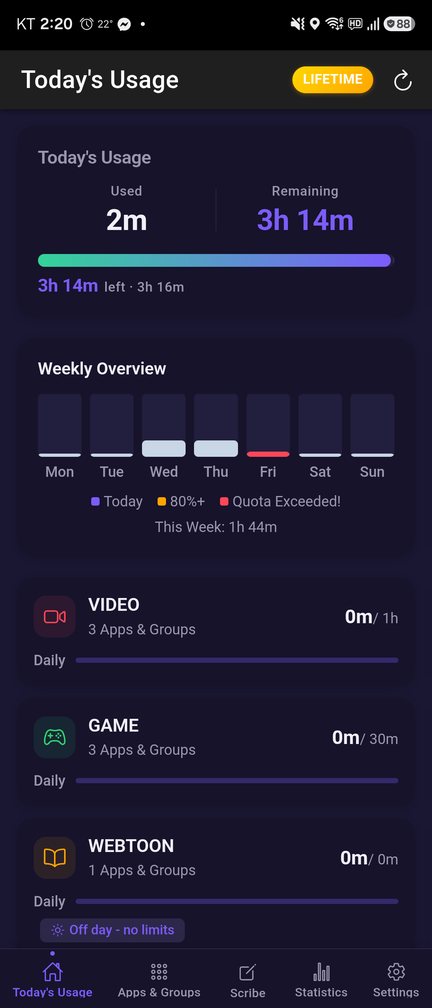
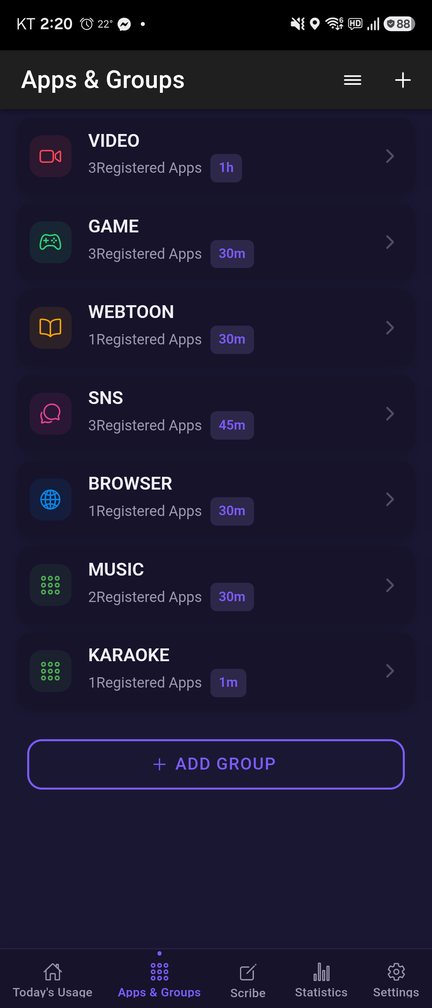
Today's usage Time's up screen

How D.off Works

Group your apps, set a daily limit, and decide again — deliberately — when the limit arrives.

1

Group Your Apps

Social, Games, Video, or anything you define. Set a daily limit per group.

→
2

Track in Real Time

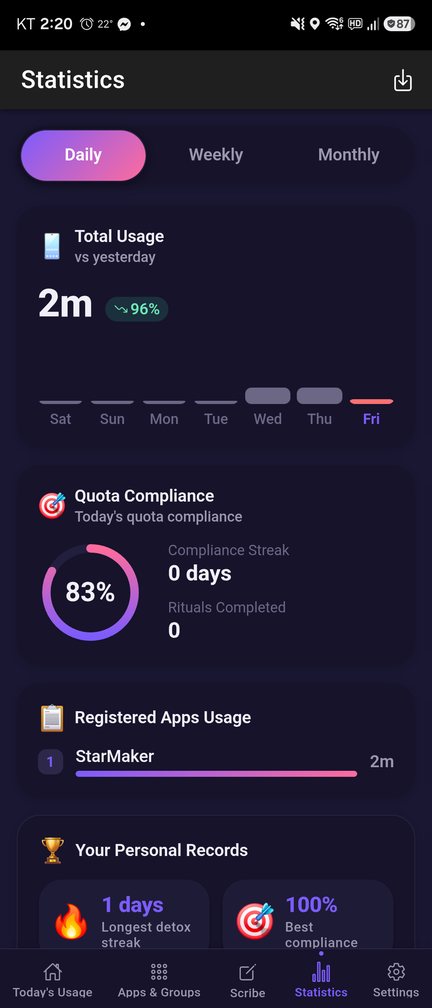
D.off tracks usage as you go and shows daily charts (weekly and monthly charts with Premium).

→
3

Lock at the Limit

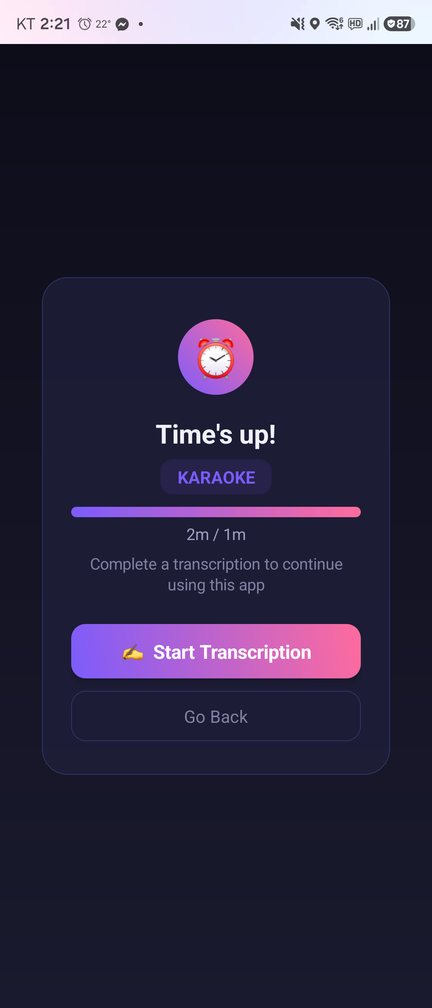
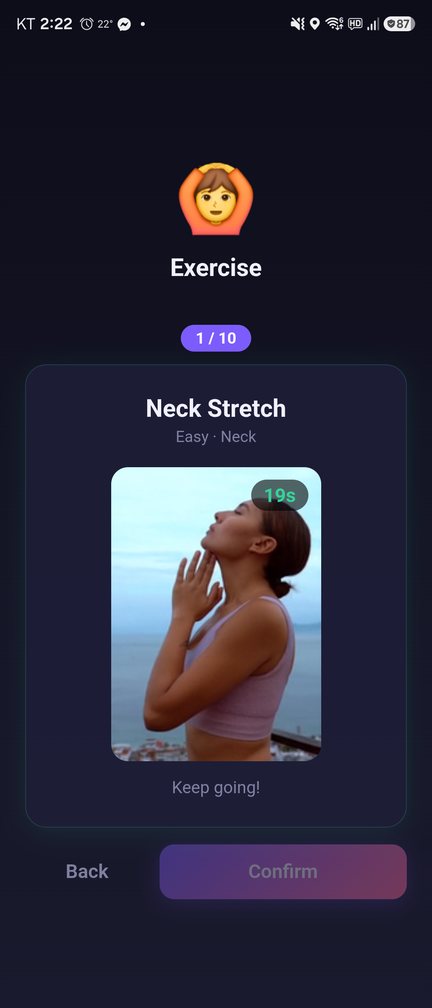
When you hit the limit, the app locks. Transcribe sentences to continue — you can swap some of them for a short physical exercise.

→
4

Keep the Streak

70+ achievements, streaks, and a Year in Detox summary mark your progress.

Core Features

Limits that actually lock — and an unlock that makes you pause.

Apps & Groups
⏰

Daily Quotas per App Group

Group apps and set a daily limit per group, enforced with a real lock screen. On Android, Premium adds weekly caps.

Core
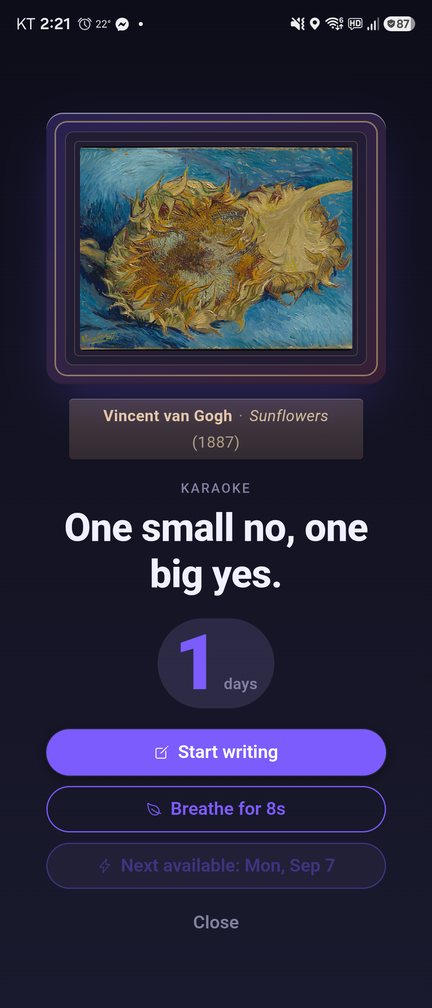
Painting and sentence screen
✍️

Transcription Unlock

At the limit, D.off gives you sentences to type out, letter by letter. 980 English sentences come bundled offline: public-domain texts, proverbs, attributed quotations and other short sentences.

Unique
Exercise unlock
💪

Exercise Unlock

Rather move than type? Swap some of the unlock sentences for a short physical exercise.

Alternative
Statistics
📊

Statistics & Achievements

Daily charts, plus weekly and monthly charts with Premium. 70+ achievements, streaks, and a Year in Detox summary. A home screen widget shows today's usage at a glance.

Insight
🌙

Sleep Lock

Premium: apps lock automatically during the bedtime hours you set.

Sleep
🌐

Site Blocker

Block distracting sites by URL pattern. Optional — it uses Android's Accessibility Service to read only the address-bar URL of supported browsers, processed on your device.

Optional

Transcription Ritual: Reflection, Not Restriction

Most screen time apps give you a "5 more minutes" button. D.off gives you sentences to transcribe.

1

The Limit Arrives

When a group's daily limit runs out, a real lock screen takes over.

2

A Painting First

Before you write, D.off shows a framed painting — a public-domain work from The Met's Open Access collection.

3

Type It Out, Letter by Letter

Typing the sentences takes long enough that the reflex to keep scrolling passes.

4

Decide Again

Then the app unlocks — and you get to decide again, deliberately this time.

Time's up screen

980 Sentences, 8 Categories

Public-domain texts, proverbs, attributed quotations and other short sentences, bundled with the app so the unlock works with no network. Across all 7 supported languages the library holds 6,238 sentences in total.

Our life is frittered away by detail. Simplify. Simplify
Henry David Thoreau Famous Quotes
This screen can wait. Your peace cannot.
Mindfulness Practice Mindfulness
God is our refuge and strength, A very present help in trouble.
Psalm 46:1 Bible
A house divided against itself cannot stand.
Abraham Lincoln History
The tortoise kept walking slowly but never stopped
The Tortoise and the Hare Fairy Tales
She walks in beauty like the night of cloudless climes and starry skies
Lord Byron Poetry & Literature
The spectacle of effort is what awakens and sustains our own effort.
William James, Talks to Teachers on Psychology (1899) Psychology
Good thoughts bear good fruit, bad thoughts bad fruit.
James Allen, As a Man Thinketh (1903) Self-Help
Our life is frittered away by detail. Simplify. Simplify
Henry David Thoreau Famous Quotes
This screen can wait. Your peace cannot.
Mindfulness Practice Mindfulness
God is our refuge and strength, A very present help in trouble.
Psalm 46:1 Bible
A house divided against itself cannot stand.
Abraham Lincoln History
The tortoise kept walking slowly but never stopped
The Tortoise and the Hare Fairy Tales
She walks in beauty like the night of cloudless climes and starry skies
Lord Byron Poetry & Literature
The spectacle of effort is what awakens and sustains our own effort.
William James, Talks to Teachers on Psychology (1899) Psychology
Good thoughts bear good fruit, bad thoughts bad fruit.
James Allen, As a Man Thinketh (1903) Self-Help

Famous quotes · History · Bible · Fairy tales · Psychology · Self-help · Mindfulness · Poetry & literature — 8 categories

Your Data Stays Yours

📱

Processed on Your Device

Any URL the Site Blocker checks is processed on your device and never leaves it.

🔐

A Backup in Your Own Account

If you sign in, your blocking groups, settings and transcription history (and your usage records on Android and on iOS app versions before 1.48.12) are backed up to your own account so they survive a phone change, and are kept until you delete your account. Other users cannot read that backup. Where usage records are uploaded, a daily summary (total minutes and quota compliance) is also stored; if you join an organization, its administrator can see the monthly average usage time and compliance rate calculated from these summaries, along with your nickname and email.

🚫

No Ads, No Data Sales

We do not sell data and we do not show ads — the advertising ID permission is explicitly removed from the app.

Simple Pricing

Start free. Upgrade when you need more.

Free

$0
Forever free
  • 2 app groups
  • Daily quotas
  • Transcription unlock
  • Basic statistics
Get Started Free
Lifetime Access

Lifetime

$79.99
One payment
  • All Premium features
  • No recurring charges
Buy Lifetime

For the first 7 days after you create an account, Premium features are on without a subscription; after that the app switches to Free, with no automatic charge. That welcome period is separate from the store subscription: a first subscription starts with a 7-day free trial, which converts to a paid subscription unless you cancel at least 24 hours before the trial ends.

Design Your Screen Time,
Starting Today

Build healthier digital habits with D.off. Start for free.